
Bring your flights
to life.
Your cabin crew. Your first officer. Your ground team.
Realistic crew interaction, announcements and turnaround operations. From boarding to shutdown, under your own airline’s name.
7 days free | $14 USD one-time purchase | No subscription
The complete crew experience
A more immersive flight from gate to gate.
Hear your crew, follow your flight plan and manage your turnaround in one Windows application.
Explore the crew experience →Cabin
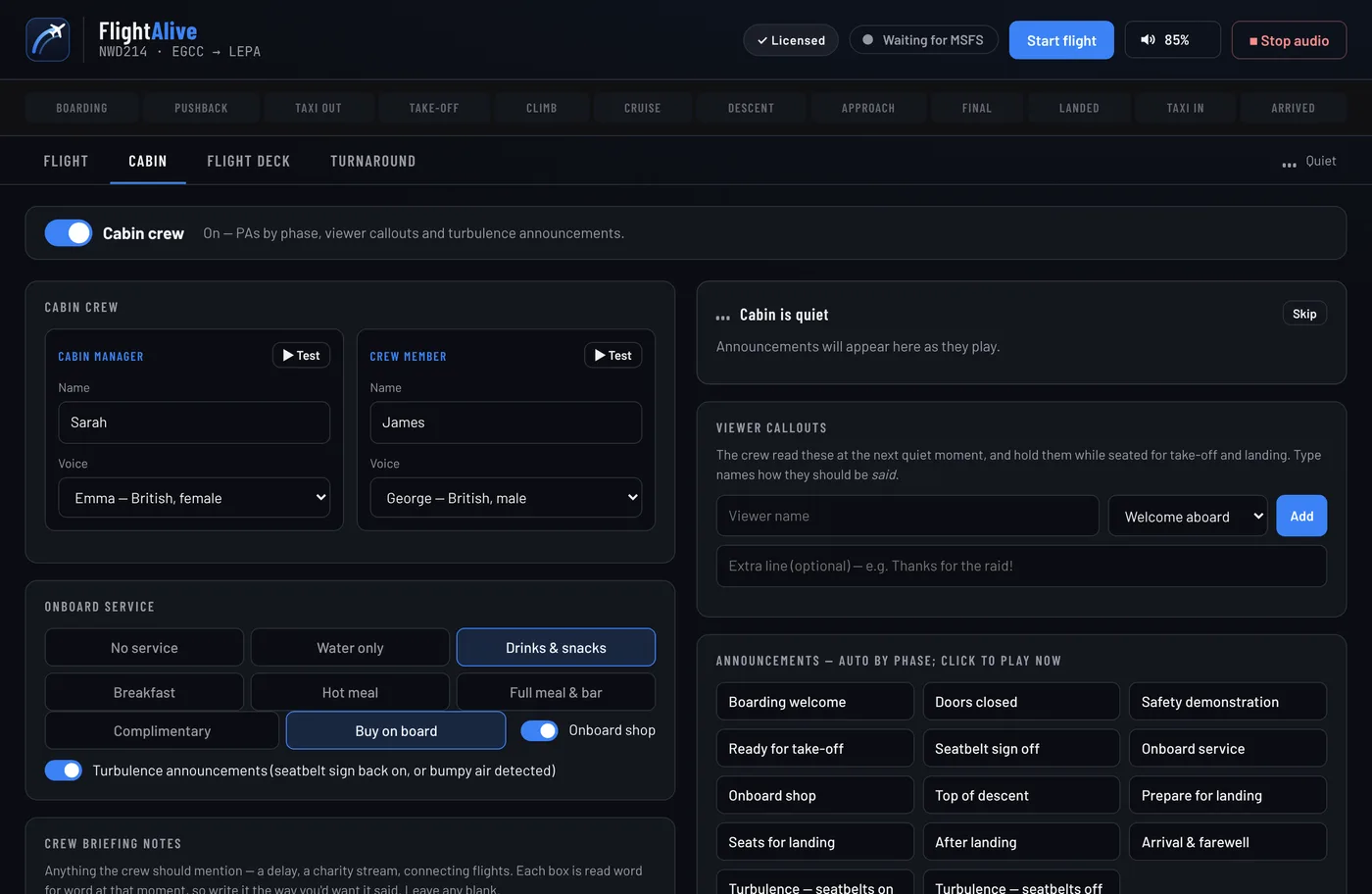
Cabin crew
Choose drinks, a hot meal or buy-on-board, add notes for the crew, and let them handle the rest. Turbulence brings the seatbelt sign back on with the right PA.
- Natural offline voices, free, that run on your PC
- Every line the crew say can be edited to suit your airline
- Separate volume for the cabin and the flight deck
- The cabin crew report broken seats to the flight deck, and they stay blocked on that aircraft until they're fixed
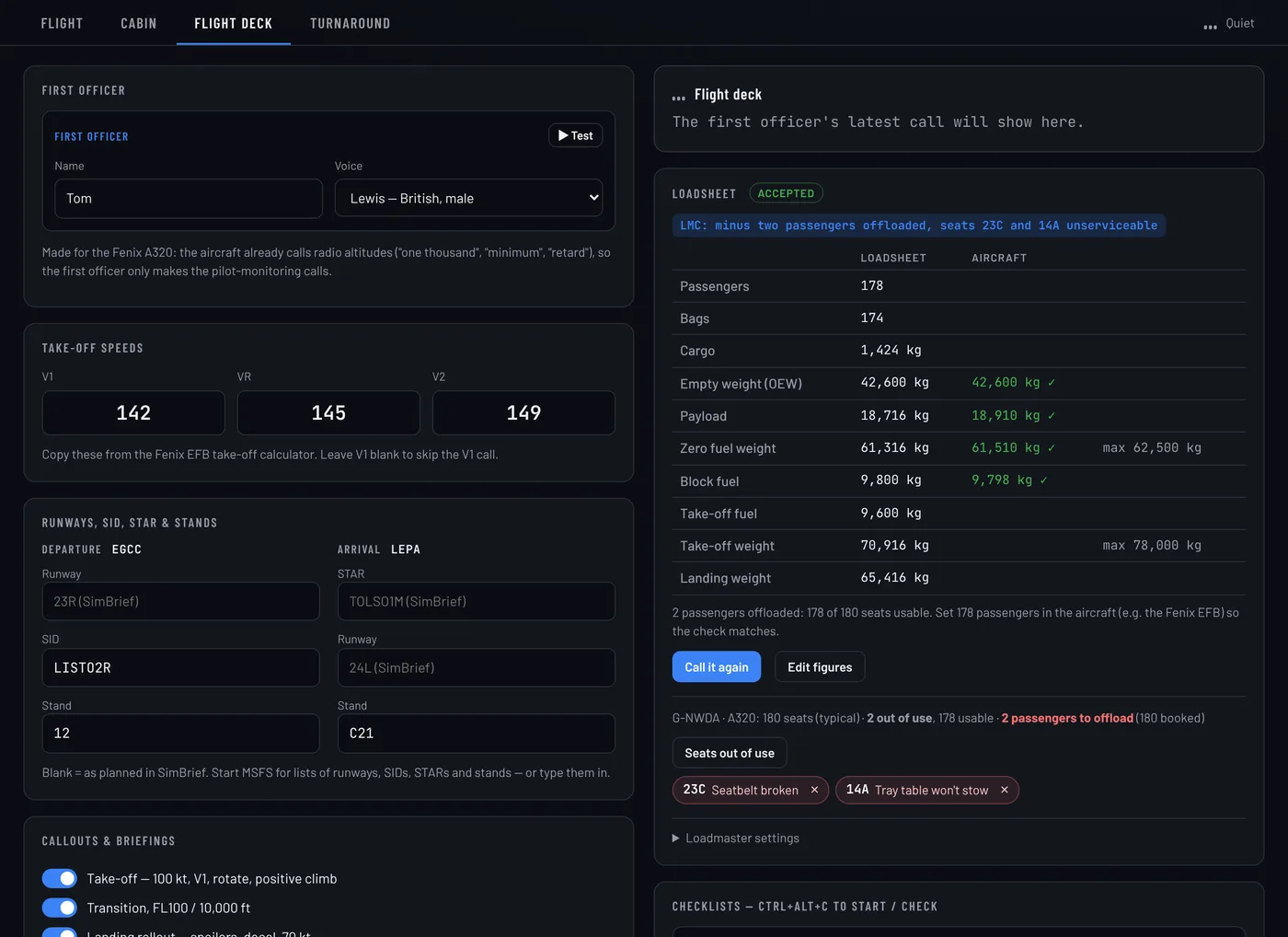
Flight deck
First officer and loadmaster
Briefings drawn from your SimBrief plan and the runway, SID, STAR and stand you're given, standard callouts on the roll and on approach, and checklists that read each item and wait for you.
- Callouts tuned for airliners like the Fenix A320, with options to match how you fly
- Checklists from before start to securing the aircraft, on a hotkey
- Pick your runway, SID, STAR and stand from MSFS, and the first officer re-briefs if they change
- The loadsheet shows empty weight, payload and ZFW against the aircraft, and you can enter your own figures if your SimBrief profile is off
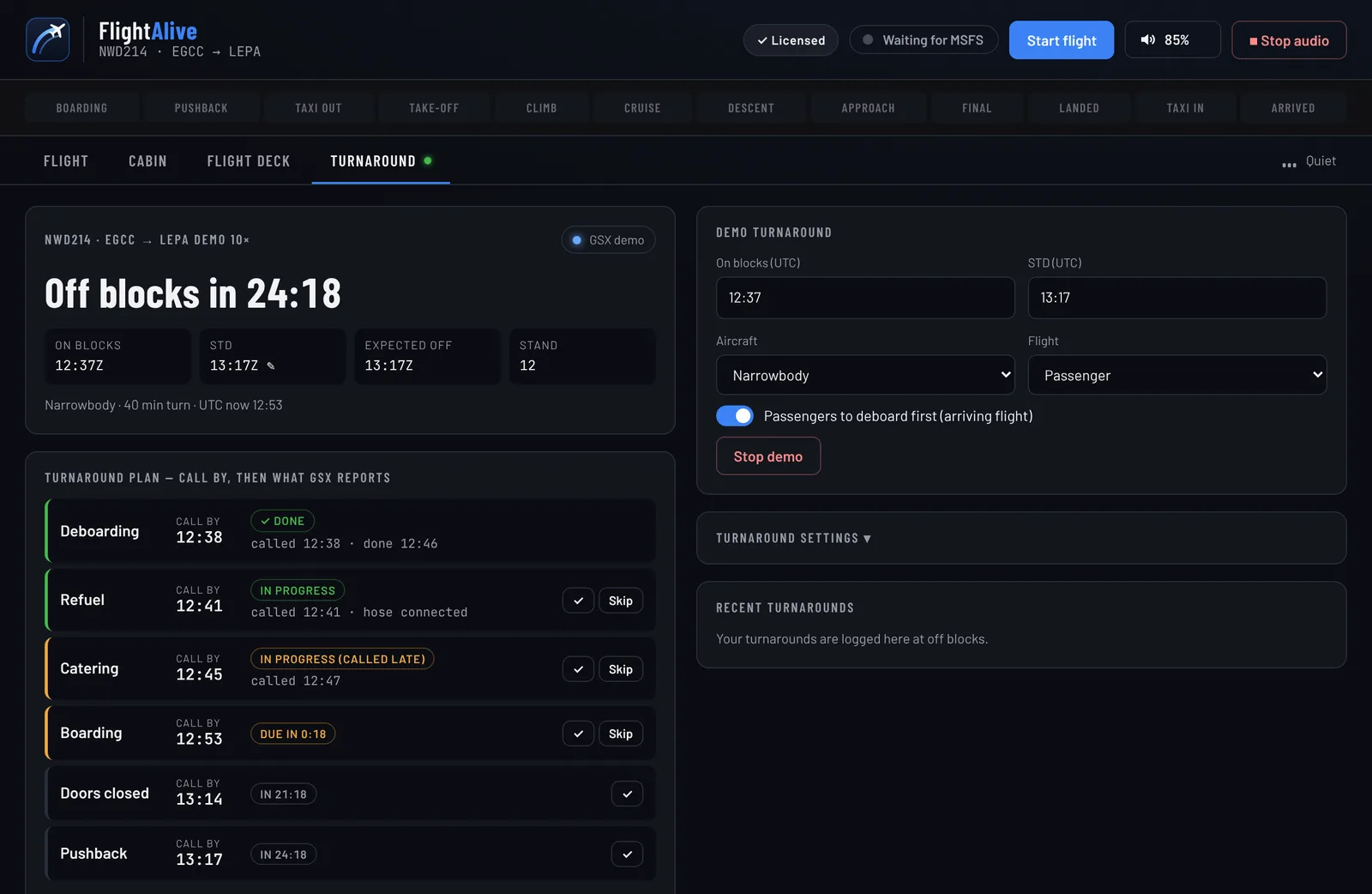
Turnaround
Ground operations
Load your next flight and FlightAlive builds the turn back from your departure time: when to call deboarding, fuel, catering and boarding, and when the doors should close.
- Reads GSX Pro's live service status. You still call everything yourself from the GSX menu.
- Green, amber and red show what's on time, due or late, with a countdown to off blocks.
- Late into the gate? The plan squeezes down, then gives you a new expected off-blocks time.
- The cabin manager calls when boarding's complete, and the final loadsheet follows.
- No GSX? Tick each service off as you go. The timings still work.
Personalisation
Your airline and your stream
Create airline profiles with individual crew names, voices and colours. FlightAlive selects the matching profile from SimBrief. For streaming, use the OBS overlay and personalised viewer announcements.
FlightAlive product trailer
A quick look at how FlightAlive works, from setup to a complete flight, with your virtual crew by your side.
- Realistic crew and cockpit interaction
- Automatic flight-phase announcements
- Integrated turnaround management
- Built for MSFS 2020 and 2024
Getting going
Flying with your crew in five minutes
Download and open
Unzip FlightAlive anywhere and run it. It can start with MSFS automatically and sit quietly in the tray.
Set up your airline
Airline name, ICAO code, crew names and colour. Then fetch your SimBrief plan.
Fly
Press Start flight at the gate. FlightAlive follows the aircraft from boarding to arrival.
Purchase a licence
Try everything free for 7 days. If you like it, one payment unlocks it for good.
What you need
- PC
- Windows 10 or 11 (64-bit)
- Simulator
- Microsoft Flight Simulator 2020 or 2024
- Flight plans
- A free SimBrief account
- Turnaround
- GSX Pro for live service tracking (optional)
- Disk
- About 600 MB, including the voices
FlightAlive talks to MSFS on your own PC. It doesn't connect to ATC networks or change your aircraft.
- Every feature: cabin, flight deck, loadmaster and turnaround
- Use it on up to 2 of your PCs
- All 1.x updates included
- No subscription, no account
Secure checkout by Creem, who handle VAT and sales tax. Your licence key arrives by email straight away.
Support and frequently asked questions
Which aircraft does it work with?
Any airliner in MSFS. FlightAlive follows the flight using the sim's own data: engines, beacon, ground speed, altitude, gear. The first officer's callouts are tuned for aircraft like the Fenix A320, and you can turn individual callouts off to suit yours.
Do I need GSX Pro?
No. GSX Pro lets the Turnaround tab follow each service live. Without it you tick services off yourself, and the plan and timings still work. Everything else in FlightAlive works without GSX.
What happens when the trial ends?
FlightAlive still opens and keeps all your settings, but it won't start flights or turnarounds until you enter a licence key. Buy it, paste the key from your email, and you're straight back in.
Does it need the internet?
Only now and then. The voices run offline once downloaded. Your licence is checked online occasionally, and FlightAlive keeps working for up to two weeks between checks.
Can I move it to a new PC?
Yes. Your licence covers up to 2 PCs at once. To move it, use "Remove from this PC" in FlightAlive's licence window, then enter the same key on the new one.
Can I use it on stream?
Yes, that's what it was built for. There's an OBS overlay, the crew audio has its own Volume Mixer entry, and your viewers can be welcomed by name.
My loadsheet doesn't match my aircraft. What do I do?
Usually it's the passenger or empty weights in your SimBrief airframe, and FlightAlive tells you which one is out. Fix it in SimBrief, turn on "Use the aircraft's empty weight", or press Edit figures and Match the aircraft to copy the weights straight from the sim. Plans in pounds are converted to kg automatically, or you can switch FlightAlive to pounds.
Is it a subscription?
No. You pay once, and every 1.x update is included.
Something's not working. Who do I contact?
Email [email protected] with what happened, and send the log from FlightAlive's Flight tab if you can.